> ## Documentation Index
> Fetch the complete documentation index at: https://continue-docs-dependabot-npm-and-yarn-docs-typeorm-0-3-30.mintlify.site/llms.txt
> Use this file to discover all available pages before exploring further.
# Quickstart
export const OSAutoDetect = () => {
return ;
};
Continue CLI (`cn`) is a terminal-based coding agent. It can edit files, run commands, and work through multi-step tasks — the same agent that powers the Continue IDE extensions, running in your terminal.
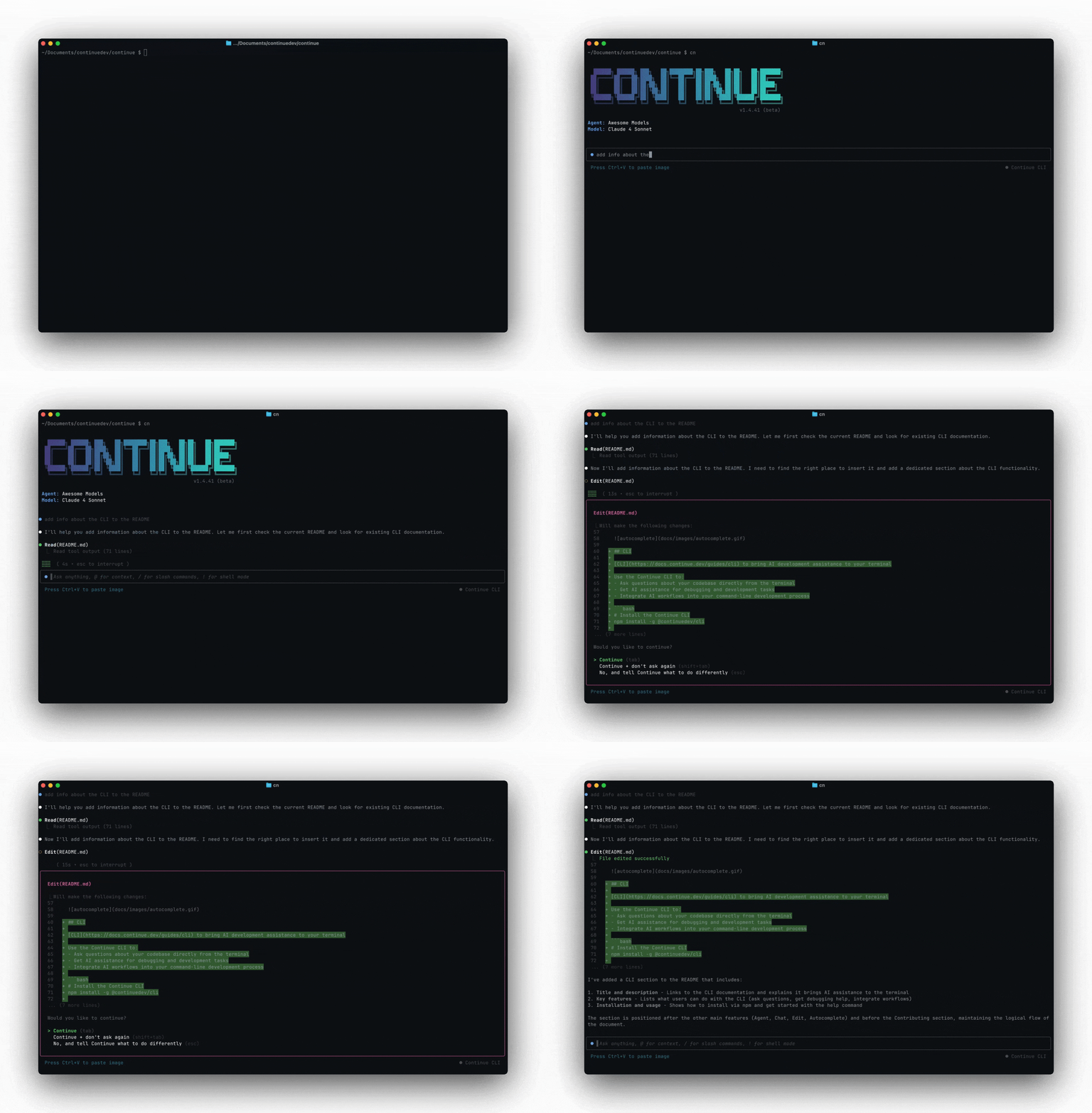 ## Install
```bash theme={null}
curl -fsSL https://raw.githubusercontent.com/continuedev/continue/main/extensions/cli/scripts/install.sh | bash
```
```powershell theme={null}
irm https://raw.githubusercontent.com/continuedev/continue/main/extensions/cli/scripts/install.ps1 | iex
```
If you already have Node.js 20+:
```bash theme={null}
npm i -g @continuedev/cli
```
Verify the installation:
```bash theme={null}
cn --version
```
### Requirements
* **Node.js 20+** — needed for the npm install path. The shell installer bundles its own runtime.
* A [Continue](https://continue.dev) account, or an Anthropic API key.
## First run
```bash theme={null}
cd your-project
cn
```
On first launch you'll be asked to log in with [Continue](https://continue.dev) or enter an Anthropic API key. After that, you're in a session and can start typing.
## Authentication
### Log in with Continue
```bash theme={null}
cn login
```
This opens your browser to authenticate with [Continue](https://continue.dev). Once authenticated, `cn` can use your configured assistants, models, and MCP servers from the platform.
### API key (headless / CI)
For automation environments where there's no browser, set the `CONTINUE_API_KEY` environment variable:
```bash theme={null}
export CONTINUE_API_KEY=your-key-here
cn -p "your prompt"
```
### Local API key
If you don't want to use Continue, you can use an Anthropic API key directly. On first launch, `cn` will prompt you to choose between logging in with Continue or entering an Anthropic API key.
## Two modes
**[TUI mode](/cli/tui-mode)** — run `cn` to start an interactive session. You type messages, reference files with `@`, approve tool calls, and iterate with the agent. This is the default.
**[Headless mode](/cli/headless-mode)** — run `cn -p "your prompt"` for single-shot automation. The agent runs to completion and prints its response to stdout. Use this in scripts, CI/CD, and git hooks.
## Common flags
| Flag | Effect |
| ------------------------- | --------------------------------------------- |
| `-p "prompt"` | Headless mode — run prompt and exit |
| `--config ` | Use a specific config file or assistant |
| `--resume` | Resume the most recent session |
| `--auto` | Allow all tools without prompting |
| `--readonly` | Plan mode — read-only tools only |
| `--allow ` | Allow a specific tool (repeatable) |
| `--exclude ` | Exclude a specific tool (repeatable) |
| `--rule ` | Add a rule — file path or string (repeatable) |
| `--mcp ` | Add an MCP server by slug (repeatable) |
| `--model ` | Add a model by slug (repeatable) |
| `--agent ` | Load an agent file by slug |
| `--verbose` | Enable verbose logging |
Run `cn --help` for the full list.
## Install
```bash theme={null}
curl -fsSL https://raw.githubusercontent.com/continuedev/continue/main/extensions/cli/scripts/install.sh | bash
```
```powershell theme={null}
irm https://raw.githubusercontent.com/continuedev/continue/main/extensions/cli/scripts/install.ps1 | iex
```
If you already have Node.js 20+:
```bash theme={null}
npm i -g @continuedev/cli
```
Verify the installation:
```bash theme={null}
cn --version
```
### Requirements
* **Node.js 20+** — needed for the npm install path. The shell installer bundles its own runtime.
* A [Continue](https://continue.dev) account, or an Anthropic API key.
## First run
```bash theme={null}
cd your-project
cn
```
On first launch you'll be asked to log in with [Continue](https://continue.dev) or enter an Anthropic API key. After that, you're in a session and can start typing.
## Authentication
### Log in with Continue
```bash theme={null}
cn login
```
This opens your browser to authenticate with [Continue](https://continue.dev). Once authenticated, `cn` can use your configured assistants, models, and MCP servers from the platform.
### API key (headless / CI)
For automation environments where there's no browser, set the `CONTINUE_API_KEY` environment variable:
```bash theme={null}
export CONTINUE_API_KEY=your-key-here
cn -p "your prompt"
```
### Local API key
If you don't want to use Continue, you can use an Anthropic API key directly. On first launch, `cn` will prompt you to choose between logging in with Continue or entering an Anthropic API key.
## Two modes
**[TUI mode](/cli/tui-mode)** — run `cn` to start an interactive session. You type messages, reference files with `@`, approve tool calls, and iterate with the agent. This is the default.
**[Headless mode](/cli/headless-mode)** — run `cn -p "your prompt"` for single-shot automation. The agent runs to completion and prints its response to stdout. Use this in scripts, CI/CD, and git hooks.
## Common flags
| Flag | Effect |
| ------------------------- | --------------------------------------------- |
| `-p "prompt"` | Headless mode — run prompt and exit |
| `--config ` | Use a specific config file or assistant |
| `--resume` | Resume the most recent session |
| `--auto` | Allow all tools without prompting |
| `--readonly` | Plan mode — read-only tools only |
| `--allow ` | Allow a specific tool (repeatable) |
| `--exclude ` | Exclude a specific tool (repeatable) |
| `--rule ` | Add a rule — file path or string (repeatable) |
| `--mcp ` | Add an MCP server by slug (repeatable) |
| `--model ` | Add a model by slug (repeatable) |
| `--agent ` | Load an agent file by slug |
| `--verbose` | Enable verbose logging |
Run `cn --help` for the full list.