> ## Documentation Index
> Fetch the complete documentation index at: https://continue-docs-dependabot-npm-and-yarn-docs-typeorm-0-3-30.mintlify.site/llms.txt
> Use this file to discover all available pages before exploring further.
# TUI Mode
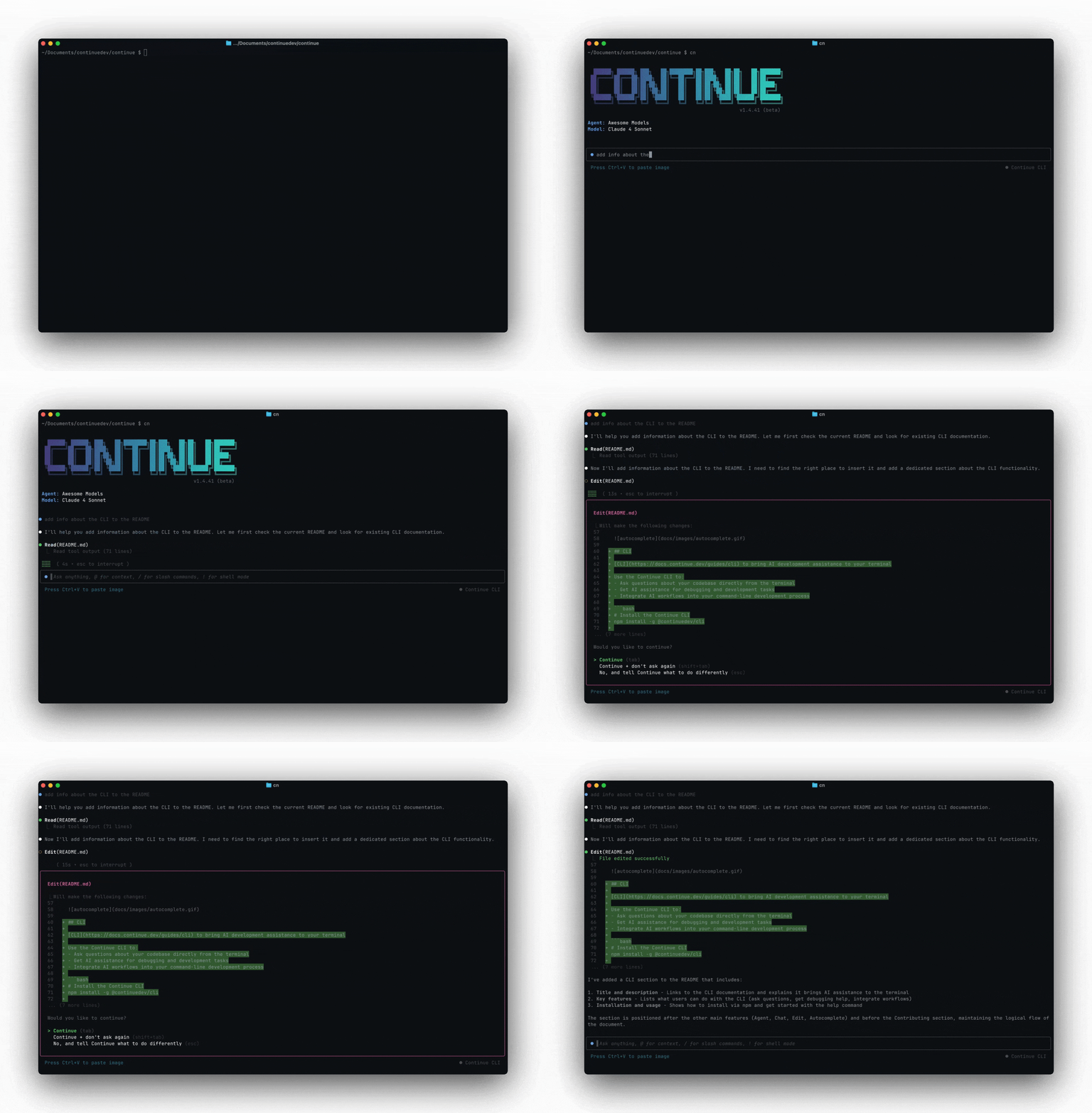
Run `cn` to start an interactive session. You get a prompt where you can type messages, reference files with `@`, and use slash commands. `cn` uses the same underlying agent as the Continue IDE extensions.
 ## `@` Context
Use `@` to point the agent at specific files or directories:
```
> @src/auth/middleware.ts Why is this middleware rejecting valid tokens?
> @tests/ Write missing test cases for the auth module
> @package.json @tsconfig.json Help me set up path aliases
```
The agent reads the referenced files and uses them as context for its response.
## Slash Commands
Type `/` to see available commands. Run `/help` for the full list.
| Command | What it does |
| ---------- | -------------------------------------------------------- |
| `/help` | Show the help message and keyboard shortcuts |
| `/clear` | Clear the chat history |
| `/login` | Authenticate with your account |
| `/logout` | Sign out of your current session |
| `/update` | Update the Continue CLI |
| `/whoami` | Check who you're currently logged in as |
| `/info` | Show session information, including token usage and cost |
| `/model` | Switch between configured chat models |
| `/config` | Switch configuration or organization |
| `/mcp` | Manage MCP server connections |
| `/init` | Create an `AGENTS.md` file for the current project |
| `/compact` | Summarize chat history into a compact form |
| `/resume` | Resume a previous chat session |
| `/fork` | Start a forked chat session from the current history |
| `/title` | Set the title for the current session |
| `/rename` | Rename the current session (alias for `/title`) |
| `/exit` | Exit the chat |
| `/jobs` | List background jobs |
When you're connected to a remote environment, Continue also adds remote-only slash commands such as `/diff` and `/apply`.
## Resume previous sessions
Pick up where you left off:
```bash theme={null}
# Resume the most recent session
cn --resume
# Or use the slash command inside a session
> /resume
```
This restores the full conversation history, so the agent remembers prior context.
## Interactive questions in TUI mode
The agent can use the `AskQuestion` tool to gather clarifications before it continues. You will see a quiz-style prompt directly in the terminal.
* Use ↑/↓ to highlight an option
* Press Enter to submit the highlighted option
* Start typing to send a custom answer (even when options are shown)
* If a default answer is provided, pressing Enter on an empty input submits that default
This is useful when the agent needs decisions like scope, preferences, or environment details before making edits.
## Tool Permissions
Tools that can modify your system (file writes, terminal commands) prompt for approval before executing. You get three options:
* **Continue** — approve this call
* **Continue + don't ask again** — approve and save a policy rule to `~/.continue/permissions.yaml`
* **No** — reject the call and give the agent new instructions
Read-only tools (`Read`, `List`, `Search`, `Fetch`, `Diff`, `AskQuestion`) run automatically. See [tool permissions](/cli/tool-permissions) for the full policy system.
## `@` Context
Use `@` to point the agent at specific files or directories:
```
> @src/auth/middleware.ts Why is this middleware rejecting valid tokens?
> @tests/ Write missing test cases for the auth module
> @package.json @tsconfig.json Help me set up path aliases
```
The agent reads the referenced files and uses them as context for its response.
## Slash Commands
Type `/` to see available commands. Run `/help` for the full list.
| Command | What it does |
| ---------- | -------------------------------------------------------- |
| `/help` | Show the help message and keyboard shortcuts |
| `/clear` | Clear the chat history |
| `/login` | Authenticate with your account |
| `/logout` | Sign out of your current session |
| `/update` | Update the Continue CLI |
| `/whoami` | Check who you're currently logged in as |
| `/info` | Show session information, including token usage and cost |
| `/model` | Switch between configured chat models |
| `/config` | Switch configuration or organization |
| `/mcp` | Manage MCP server connections |
| `/init` | Create an `AGENTS.md` file for the current project |
| `/compact` | Summarize chat history into a compact form |
| `/resume` | Resume a previous chat session |
| `/fork` | Start a forked chat session from the current history |
| `/title` | Set the title for the current session |
| `/rename` | Rename the current session (alias for `/title`) |
| `/exit` | Exit the chat |
| `/jobs` | List background jobs |
When you're connected to a remote environment, Continue also adds remote-only slash commands such as `/diff` and `/apply`.
## Resume previous sessions
Pick up where you left off:
```bash theme={null}
# Resume the most recent session
cn --resume
# Or use the slash command inside a session
> /resume
```
This restores the full conversation history, so the agent remembers prior context.
## Interactive questions in TUI mode
The agent can use the `AskQuestion` tool to gather clarifications before it continues. You will see a quiz-style prompt directly in the terminal.
* Use ↑/↓ to highlight an option
* Press Enter to submit the highlighted option
* Start typing to send a custom answer (even when options are shown)
* If a default answer is provided, pressing Enter on an empty input submits that default
This is useful when the agent needs decisions like scope, preferences, or environment details before making edits.
## Tool Permissions
Tools that can modify your system (file writes, terminal commands) prompt for approval before executing. You get three options:
* **Continue** — approve this call
* **Continue + don't ask again** — approve and save a policy rule to `~/.continue/permissions.yaml`
* **No** — reject the call and give the agent new instructions
Read-only tools (`Read`, `List`, `Search`, `Fetch`, `Diff`, `AskQuestion`) run automatically. See [tool permissions](/cli/tool-permissions) for the full policy system.